Skip to content

Integrations

On top of whatyou already run.

NovaDental reads your practice-management system, your books and your imaging — and leaves each in charge of what it already does. Nothing ripped out. Nothing written back.

Built for

  • DentrixPractice managementConnection being finished
  • Open DentalPractice managementConnection being finished
  • EaglesoftPractice managementConnection being finished
  • QuickBooksAccountingConnect in Settings
  • TwilioTextingConnect in Settings

QuickBooks and Twilio connect in Settings. Practice-management connections are being finished — Dentrix first, then Open Dental and Eaglesoft. Ask in the walkthrough where yours stands.

Open Dental, Dentrix, Eaglesoft, QuickBooks and Twilio are trademarks of their respective owners. NovaDental is not affiliated with or endorsed by them.

Where we are today · as of November 18, 2026

Practice software
Practice-software connections are being finished: Dentrix first, then Open Dental and Eaglesoft. Read-first; write-back is off.
Your software
Your practice keeps its existing software. NovaDental sits on top of it.
The assistant
Nova answers about the practice, and about one patient from that patient's page. Clinical AI stays off.
AI usage
AI usage is metered on top (about $15–$180 a month for most practices).

Setup saved is not a connection. A connection is not verified data.

  1. Step 1

    Setup saved

    Your answers, your team and your goals are in. This is not a connection.

  2. Step 2

    Connection ready

    Your practice software is connected, read-first.

  3. Step 3

    First data verified

    What came in is checked against the source before anyone relies on it.

  4. Step 4

    Working practice

    The numbers are the practice's own, each with its source.

One system, many sources

Everything you run. One set of numbers.

Your PMS stays the system of record. QuickBooks stays the books. Your imaging stays where the pictures are taken. NovaDental reads from each and keeps a copy of what it reads in one place, so the whole team works from the same numbers. It never changes the originals.

Practice management

Connections being finished now: Dentrix first, then Open Dental and Eaglesoft. Read-first. Write-back is switched off.

  • Dentrix

    Read-first sync · being finished

  • Open Dental

    Read-first sync · being finished

  • Eaglesoft

    Read-first sync · being finished

Books and history

A year of P&L and two years of practice totals, from day one.

  • QuickBooks

    Last 12 months of P&L

  • History import

    24 months of totals

Messaging

Your practice's own Twilio account, connected in Settings. Patient video links also need the practice's video storage set up.

  • Twilio

    Texts, reminders and private links

Imaging and capture

A person confirms every image match.

  • NovaSync

    Imaging computers

  • NovaCapture

    Chairside capture

PMS Sync

Read first. Write-back is switched off.

NovaDental is built to read from your practice software, and those connections are being finished now: Dentrix first, then Open Dental and Eaglesoft. It reads patients, the schedule, procedures and fees — each value carrying where it came from. Treatment plans come after that.

Write-back demos beautifully. It also means two systems can edit the same record. We'd rather your PMS stays the one place that's true.

  • Patients
  • Schedule
  • Procedures
  • Fees
PMS Sync · Accuracy
Sync healthHealthy · 6 min ago
Unmapped codes3 to review
Conflict inbox1 — you decide

A crown fee differs between the treatment plan and the procedure log. Keep which?

PlanProcedure log
Write-backSwitched off

Illustrative screen · sample data

  • Mapping wizard

    Your codes, mapped once, with you — not guessed from a template.

  • Unmapped-code queue

    A new code surfaces for review instead of quietly vanishing.

  • Conflict inbox

    When two records disagree, a person decides which is right.

  • Reconciliation

    Totals are checked against the source, so drift shows up early.

  • Sync health

    When it last ran, what came in, and anything that needs a look.

Books and history

Numbers with a memory. From day one.

QuickBooks Online

Your P&L, a year deep.

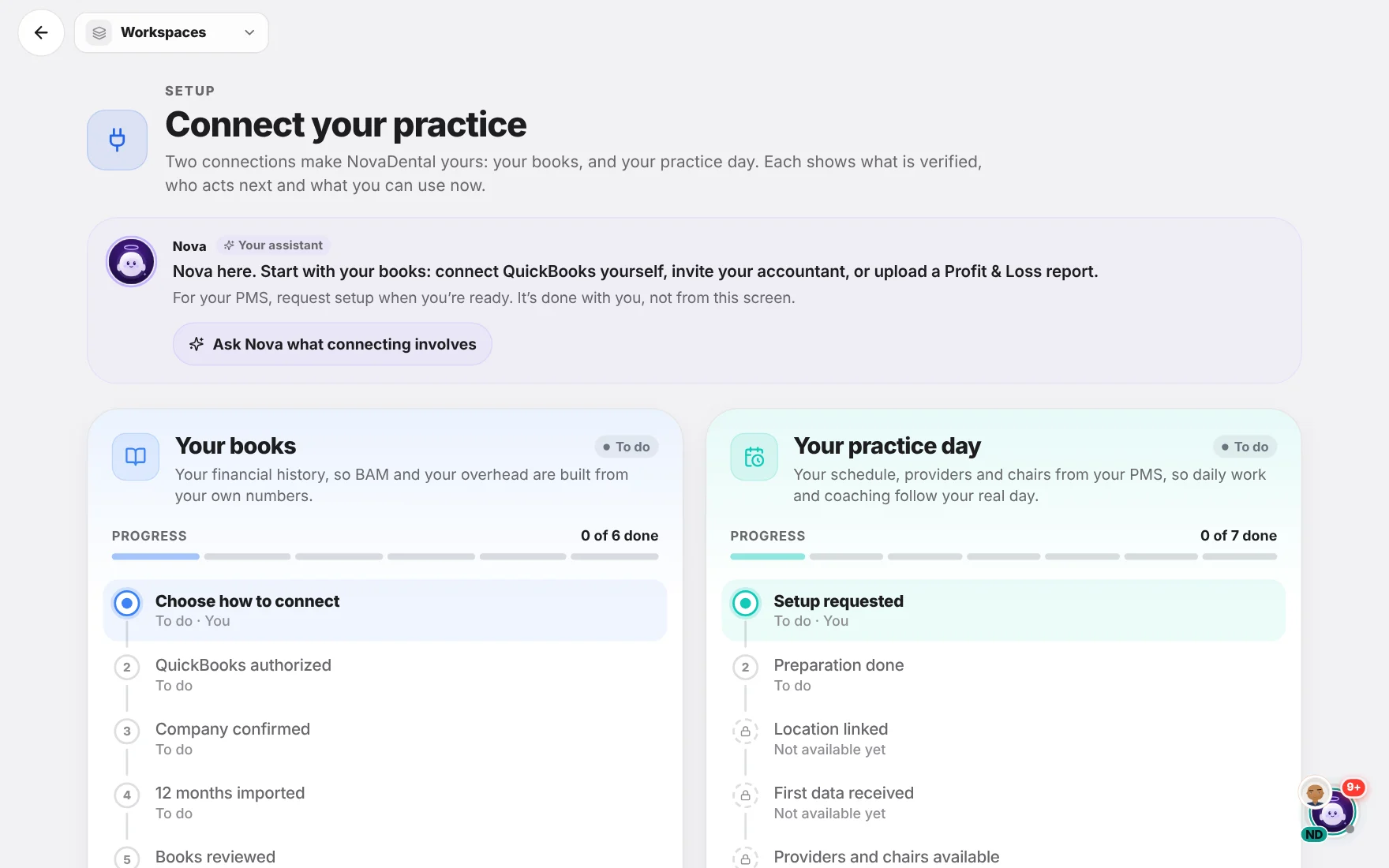
Connect QuickBooks Online and the last twelve completed months of profit and loss come in, company by company — the books behind Vision's money views and the hiring calculator.

  • Last 12 completed months of P&L
  • Company by company, with live progress
  • Feeds Vision and the hiring calculator
History import

Two years of context, not a blank chart.

Bring in 24 months of practice totals from an Open Dental report, or enter them by hand — so trends mean something the week you start.

  • 24 months of practice totals
  • From an Open Dental report
  • Or entered manually
NovaDental Practice Software settings with sample data: connect QuickBooks Online, import PMS history, and the practice's data readiness.

NovaDental, shown with demo data

Imaging and capture

The pictures come in. A person says whose they are.

A clinical photo is how a patient sees what the doctor sees, and the record of what was there. It only helps if it reaches the right chart — from the chair, and from the imaging computers in every operatory.

Automatic matching would be faster. It would also, one day, put the wrong mouth in the wrong chart. So a person confirms every match — and can undo it.

NovaSync

From the operatory computer to a Media Inbox.

A background service on the practice's Windows computers picks up photos and video from intraoral cameras and imaging software, and delivers them to a Media Inbox in NovaDental.

  • Received means verified — nothing is marked received until it checks out
  • No file names or folder paths leave the building
  • A person confirms every match, and can undo it
Learn more about NovaSync

NovaCapture

Chairside capture, bound to today.

Capture photos at the chair, already tied to today's appointments — and keep working when the Wi-Fi doesn't.

  • Bound to today's appointments, before the shutter
  • A guided photo series, each shot named
  • Works offline
  • Every photo carries who took it
Learn more about NovaCapture

Illustrative screen · sample data

Every match confirmed by a person Every match can be undone

Your data's journey

From your systems to your huddle. Five honest steps.

  1. 01

    It starts where it lives

    Your PMS, your QuickBooks company, your imaging computers. NovaDental reads them and copies what it reads; the originals stay as they are.

  2. 02

    It crosses one bridge

    A secure connection to your PMS, a QuickBooks connection for the books, NovaSync for images.

  3. 03

    It's checked on arrival

    Codes mapped, totals reconciled, media verified. Every value keeps its source.

  4. 04

    A person settles doubts

    Conflicts wait in an inbox. Image matches wait for someone to confirm.

  5. 05

    Your team acts on it

    News, Opportunities, Vision and Analytics — all read from the same numbers.

Tell us what you run. We'll say what connects.

We go through your PMS, your books and your imaging setup, and tell you plainly how each one connects for your practice.

What happens next

  1. Tell us about your practice

    Your role, your system and what you'd like to see.

  2. We prepare around your practice

    A person shapes it around your systems and your questions.

  3. A short, honest conversation

    The product, your questions, and a plain answer on fit.