The tools
Your practices. Your prep.Your room. Your plan.
See every practice you coach, prepare each conversation, present only what you approved, and agree one small trial the team accepts step by step. Each tool is marked with what it needs.
Everything in NovaCoach
Every tool, by the moment you reach for it.
Preparation
Know where to focus, and walk in with the practice's own picture.
Every practice you coach6 features in Every practice you coachWho needs you, who you meet next, and what changed.
- Needs attention
- Who you meet next
- What changed
- Alerts on Home
- One board for all your practices
- Your Monday brief
Ask about your book3 features in Ask about your bookExact answers from your records — and Nova for the rest, with its sources.
- Answered from your records
- Nova's reading, with sources
- Honest gaps
The practice's money3 features in The practice's moneyThe P&L from QuickBooks and an overhead grade, in totals.
- The P&L, from QuickBooks
- Overhead, graded
- Provider performanceFull access
The practice's day6 features in The practice's dayHuddles, meetings and commitments — never the team's own words.
- Every huddle
- The Morning News
- Team meetings and commitments
- Since you last met
- A weekly scorecard
- Debriefs the practice sharesFull access
The team4 features in The teamWho's on the team, what they own, and what they're saying.
- Every team member
- Recognition
- What the team is saying
- How to coach each personFull access
Where the practice is going6 features in Where the practice is goingGoals, results, opportunities and the systems in place.
- Goals and focus
- Results, dated
- Network changes
- Unscheduled treatmentFull access
- What Vision recommendsFull access
- Systems, and how far they've gotFull access
Prepare the conversation6 features in Prepare the conversationAgendas, talking points, visit plans and a 30-60-90 roadmap for each practice.
- The agenda builder
- A team meeting brief
- Visit plans and recaps
- A 30-60-90 roadmap
- Call plans and first agendas
- A private notepad
In the session
Present to the room, only what you approved.
In the room4 features in In the roomFive chapters on the room's screen — only what you approved.
- The shared stageFull access
- Approve the exact versionFull access
- Chapter, pause, endFull access
- Private to you
Follow-through
Agree one small trial, hand it over, and show what got done.
The coaching plan6 features in The coaching planOne small trial, approved as written, accepted by the people who do it.
- One small trial, written downFull access
- Approved as writtenFull access
- Accepted by the people who do itFull access
- Workload in plain sightFull access
- Blockers, with help namedFull access
- Day 14, then the reviewFull access
Hand it to the practice5 features in Hand it to the practiceSystems, handoffs and recommendations — the practice decides.
- Send a systemFull access
- Coaching handoffs
- Goals, milestones and actionsFull access
- Notes the practice can readFull access
- A follow-up, drafted
Show the work2 features in Show the workImpact reports that say what you did — and never claim more.
- Impact reports
- Prepared by your company
Yours, and setting up
Your brand, your firm, and how a practice connects.
Your brand, your Nova, your Signature4 features in Your brand, your Nova, your SignatureHow practices see you, and how NovaCoach speaks to you.
- Your brand, in their app
- A card to share
- Your own Nova
- NoVA Signature
Coaching firms3 features in Coaching firmsOwner, admin and coach roles, within each practice's limits.
- Roles
- Assign coaches
- Hand the firm on
Connecting and access3 features in Connecting and accessAn invite link, Basic or Full, and the practice in control.
- An invite link
- The practice stays in control
- Cover a practice's subscription
The coaching dashboard
Every practice you coach. One dashboard.
Starting · 1
Began in the last 30 days
- Rivertown SmilesLead coach · Weekly
Active · 3
Live engagements
- Austin Smile DesignLead coach · Weekly
- Summit Family DentalSupporting · Weekly
- Coastline Dental StudioLead coach · Weekly
Ending or renewing · 1
Access ends, or a renewal date is recorded, within 45 days
- Mesa Bright DentalEnding · Weekly
Needs attention
Basic and FullThe practices with overdue commitments, oldest first — and a pulse at the top: practices overdue, commitments overdue and your next meeting.
Who you meet next
Basic and FullUpcoming coaching meetings in each practice's own time, with its open commitments.
What changed
Basic and FullNew team members, meetings held and commitments completed since you last looked.
Alerts on Home
Basic and FullOverdue work, an engagement ending within 14 days, a meeting today or tomorrow, and practices quiet for 30 days. Shown in NovaCoach — nothing is pushed to your phone.
One board for all your practices
Basic and FullEvery practice in Starting, Active or Ending or renewing — so a renewal is a conversation you plan, not a surprise.
Your Monday brief
Basic and FullAll your practices on one page, to copy, or to email to yourself.
Answered from your records
Basic and FullCommon questions — who needs you, who's overdue, who you meet this week, renewals, who's gone quiet, what changed, whose P&L is in — answered instantly and exactly, straight from your records.
Nova's reading, with sources
Basic and FullAnything else goes to Nova, which reads only the same records and names every practice it draws on. An answer that cites a practice you don't coach is refused.
Honest gaps
Basic and FullWhen a practice hasn't shared something, or a read fails, NovaCoach says so — it never shows a missing answer as an empty list.
Know when something changes. Review it before you call.
A new hire, a meeting held, a commitment slipping — it reaches your Home, named by practice. Leadership-only meetings stay with the practice.
- 3 commitments overdueCoastline Dental Studio
- Meeting tomorrow · 9:00 AMSummit Family Dental
- New NovaDental team member added to the practice.Summit Family Dental
- Team meeting completed.Austin Smile Design
- No coach context in 30+ daysMissoula Dental
Austin Smile Design · Agendas and decisions
What the team put on the agenda and decided
Wording the practice typed is not shown to coaches.
Preparing
Every conversation, prepared.
Your own prep for each practice. It stays with you; the practice doesn't see it.
The agenda builder
YoursEight kinds of meeting — from a doctor strategy call to an emergency intervention — laid out in timed blocks from your notes and the practice's open work. Copy it into your invite.
A team meeting brief
Basic and FullWins, what changed, open commitments and the one focus for the week — with talking points from your shared coaching context, for the practice's team meeting.
Visit plans and recaps
YoursGoals for the visit, notes beforehand, what you observed system by system, and the actions after.
A 30-60-90 roadmap
YoursDrafted with Nova from what you know about the practice, for you to edit.
Call plans and first agendas
YoursA plan for each call, and the first four agendas for a new practice.
A private notepad
YoursNotes only you see. Prep work stays on the device you made it on, and the practice never sees it.
In the room
Present it to the room. Only what you approved.
Your session's shared stage: five chapters on the room's screen, built from what you chose and approved. Your private notes stay on your side.
- Choose
- Keep private
- Approve
- Present
- Pause
- Decide
Your session · Monthly Review
Shared stage
Version 1 is on the stage
← → change chapter · Space pauses · Esc ends
The room's screenWhat the room sees, at TV size.
Keep the 7:50 huddle on surgery mornings too
Decision in this session
Step 6 of 6 · Decide
Move through it with the room.
Previous and next, a chapter at a time, until the room lands on today's decision. Ending clears the screen.
The shared stage
Full accessFive chapters on the room's TV or projector: what changed, what is working, where work is stuck, today's decision, and who does what next. Owners show as roles, never names, and money never reaches the stage.
Approve the exact version
Full accessConfirm it holds no patient details, then approve. That version is fixed — a change is a new version — and only an approved version goes on screen.
Chapter, pause, end
Full accessPresent from a second window you drag onto the TV, or full screen on a phone or tablet. The arrow keys change the chapter, Space pauses and Esc ends.
Private to you
Basic and FullObservations and your own tasks, captured as the session runs. Never on the stage, in a recap or sent to the practice.
Beyond the dashboard
Hand it to the practice. They decide.
Systems, handoffs and recommendations reach the practice for its review. Commitments are always the team's to make, and the practice runs the engagement: it pauses, schedules an end or brings you back, and your board shows where each one stands.
Your method, in the team's day.
Once the practice adds your system, it stops being a document and becomes everyone's part of the day.
- YouYou write the method.Your steps, in your words.
- LeadershipThe practice makes it theirs.With Smart SOPs on, it arrives as a draft. Leadership names a person for every step before it publishes.
- Each personEveryone sees their part.My part shows their own steps, and the handoffs either side.
- YouYou read what they share.Only a revision leadership shares: its steps and checklist, without names.
72-hour schedule gap-fill
Dana · Front office
You do 1 of 3 steps
- 1Before you · MarisolReview open time 72 hours ahead
- 2You do thisCall the standby list before releasing an opening
- 3After you · JessicaOffer openings to the unscheduled-treatment list
Shared by Coastline Dental Studio leadership
72-hour schedule gap-fill · Revision 1
- 1Review open time 72 hours ahead
- 2Call the standby list before releasing an opening
- 3Offer openings to the unscheduled-treatment list
Not in your copy
- Who is on the team
- Who owns each step
- Who acknowledged it
- LiveSOP results
Nothing is shared by default, and leadership can stop sharing at any time. A newer revision needs its own share. LiveSOP results stay with the practice's leadership. No coach view reads them.
Send a system
Full accessWrite the steps, scripts, roles, measures and cadence, and send it. The practice reviews it, then adds it to its library or asks for changes. You can recall it before they decide.
Coaching handoffs
Basic and FullAn agenda, a weekly focus, an accountability item, a KPI concern and more — into the practice's inbox, where they accept it and work it. You see where each one stands.
Goals, milestones and actions
Full accessRecommend them to the practice. The owner decides how they arrive: straight through, after the owner approves, to the doctor and owner only, or to leadership and the whole team only.
Notes the practice can read
Full accessCoaching context the practice sees beside its own records.
A follow-up, drafted
Basic and FullDraft the note after a call with Nova, then send it to the practice as guidance.
The coaching plan
One small trial. Agreed by the people who run it.
Write down what you saw and one change to try. Leadership approves that exact version, each person named accepts their own step, and the trial lands in the team's day. Then a day-14 check-in and an outcome review. Nothing in the cycle is written by AI.
One small trial, written down
Full accessWhat you observed, the outcome wanted, up to eight facts with their source and how sure they are, one to three explanations, and one change to try. Hints point out a gap; they never stop you.
Approved as written
Full accessAn owner or admin approves the exact version they were shown, asks for changes with a reason, or declines. Any edit after you submit is a new version, and you never approve your own plan.
Accepted by the people who do it
Full accessEach person named answers for their own step: accept, ask to adjust with their own time estimate, or decline. An offer isn't a task, and it expires after seven days unanswered.
Workload in plain sight
Full accessEvery step carries its time, once and per day, week, huddle or meeting, so each person's load is on the plan. Leadership also sees each person's other open work, as counts. You don't.
Blockers, with help named
Full accessSomeone stuck on a step raises a blocker, names who can help and picks a follow-up day. You see why and who is helping; the practice resolves it.
Day 14, then the review
Full accessA three-answer check-in on day 14, then the outcome review 30 to 180 days after the start, read against the practice's Results.
Your coaching company
Your name on the work. Your brand on the card.
NovaCoach carries your coaching company, not ours. Publish your brand, and practices see it on their “Your coach” card — and the impact reports you prepare for a practice say so: “Prepared by Summit Practice Coaching.”
Your brand, in their app
YoursYour logo, your color, your company and your tagline, on the practice's “Your coach” card.
A card to share
YoursYour story, specialties, a signature result and what clients say, with your website or booking link and a QR code.
Your own Nova
YoursA private assistant: its name, one of the twelve drawn characters practices choose from (or a simple orb), and a voice that matches you, blends with you or balances you.
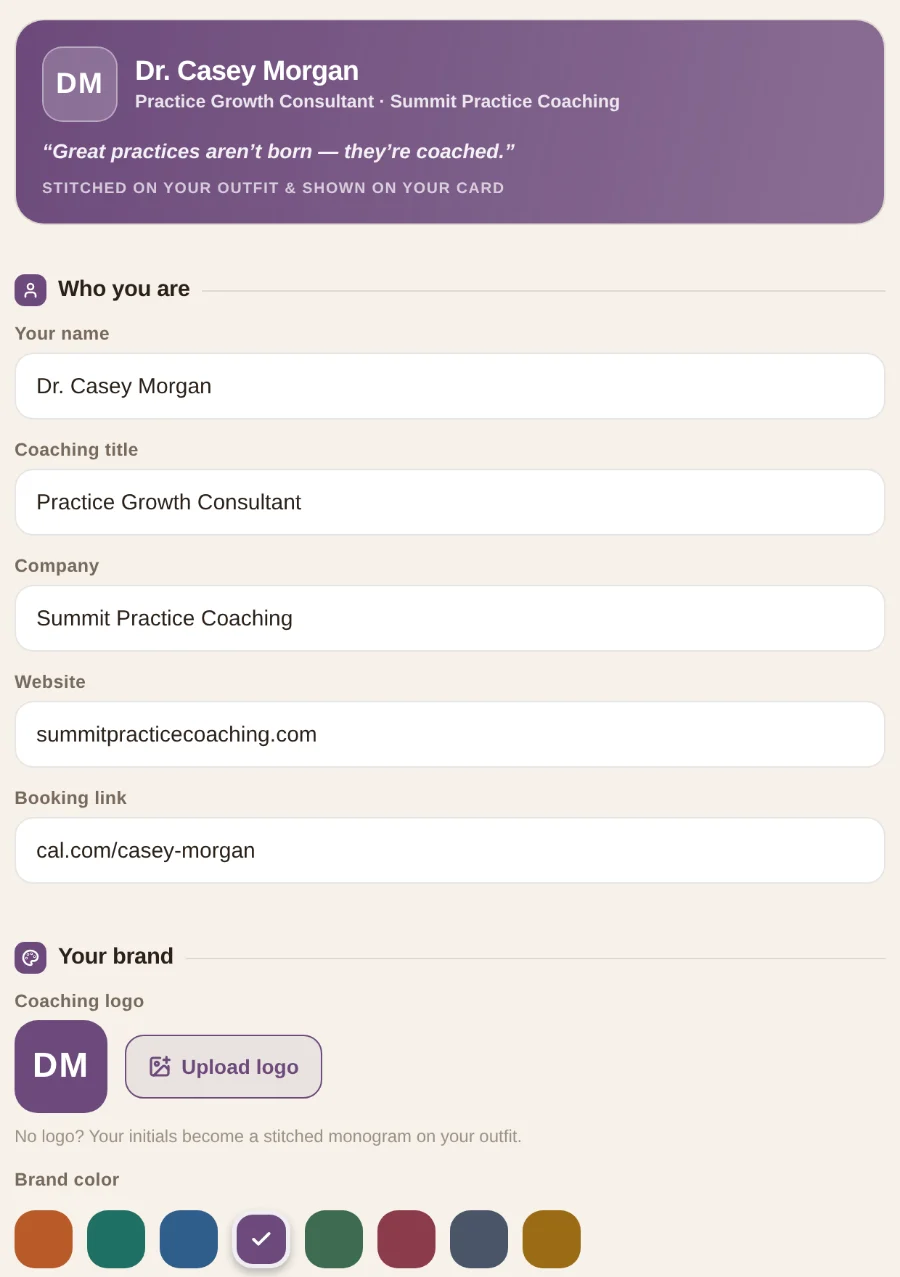
Setting up a coach card in NovaCoach, with a sample coaching company
Pick your Nova
The same twelve drawn characters practices choose from, or a simple orb in one of four colors.

Your Nova · AI assistant
Nova
Calm, polished and always close by.
NoVA Signature · for coaches
Know how you coach. Every coach takes their own.
NoVA Signature is a reflection made for coaches, on the tendencies you bring to client conversations, decisions, accountability and change: Navigator, Optimizer, Visionary or Anchor. About 15 minutes. It's yours: each coach takes their own and sees their own.
See four sample readings
Casey Morgan · Leads with Navigator, then Visionary
How you naturally coach
Your answers suggest you would rather make the call and adjust than wait for certainty, and that when a discussion has been circling, you may want to name the decision.
What you notice first
Your answers suggest you tend to look first at where the decision is stuck.
Where it may help
A possible advantage to explore: when a client has been discussing the same thing for months, your preference for landing a decision may help the conversation move.
When it's overused
You may arrive at the decision before the people who have to carry it out, and may get compliance where you wanted ownership. Taking the problem on yourself may also quietly remove it from the client.
Shown for Navigator, the style Casey leads with.
Sample readings, side by side to show the four tendencies — illustrative. In NovaCoach each coach sees only their own. The coaching language is NoVA Signature's own.
Bring your practices. We'll show you the fit.
A walkthrough of NovaCoach around the way you coach — and a plain answer on what each practice stays in control of.